EDF
Features

Complete Moodle features for academic monitoring

Board Retention unifies Moodle data for daily monitoring, risk detection, pending feedback, institutional oversight, and automated role-based reporting.

KPIs

Academic indicators

Risk

Early signals

Reports

Configurable exports

Board Retention by EDF

Functional dashboard view

Read-only

Academic KPIs

Visual indicators to support timely action

7 KPIs

Progress

82%

Risk

14

Submissions

91%

Scheduled reports

Recurring reports and exports

CSV / Excel
Teacher82%
Coordination68%
Administration91%

No custom tables

Read-only access over Moodle

Useful alerts

Early academic risk signals

Export

Configurable and repeatable

Workflow

From Moodle data to academic decisions

Board Retention follows a clear flow: secure Moodle reading, actionable indicators, and operational follow-up with reporting.

How it creates value

It is not about adding more screens to teachers’ work. It is about turning scattered data into an operational view that supports better context and less manual work.

  1. Input01

    Secure reading of Moodle data

    Board Retention queries information already available in Moodle, such as activity, grades, completion, submissions, feedback and course data.

    Outcome

    Academic data brought together without modifying courses, activities or grades.
  2. Processing02

    Indicators, KPIs and reviewable signals

    Information is organized into KPIs, charts, early risk signals and views adapted to teachers, coordinators and administrators.

    Outcome

    A clear reading of progress, engagement, performance and possible follow-up needs.

  3. Action03

    Follow-up, reports and decisions

    Teams prioritize interventions, review pending feedback, prepare reports, and run role-based automations for teaching, coordination, and leadership.

    Outcome

    Less manual review, more consistent follow-up, and stronger capacity to act early with traceable criteria.

Core Features

Core Board Retention features

Operational capabilities already available for teachers, coordination, and Moodle administration.

01

Teacher KPIs

Participation, progress, grades, activity and other key indicators in a clear and reviewable view.

02

Early risk signals

Identify changes in activity, progress or performance that may require teacher review or individual follow-up.

03

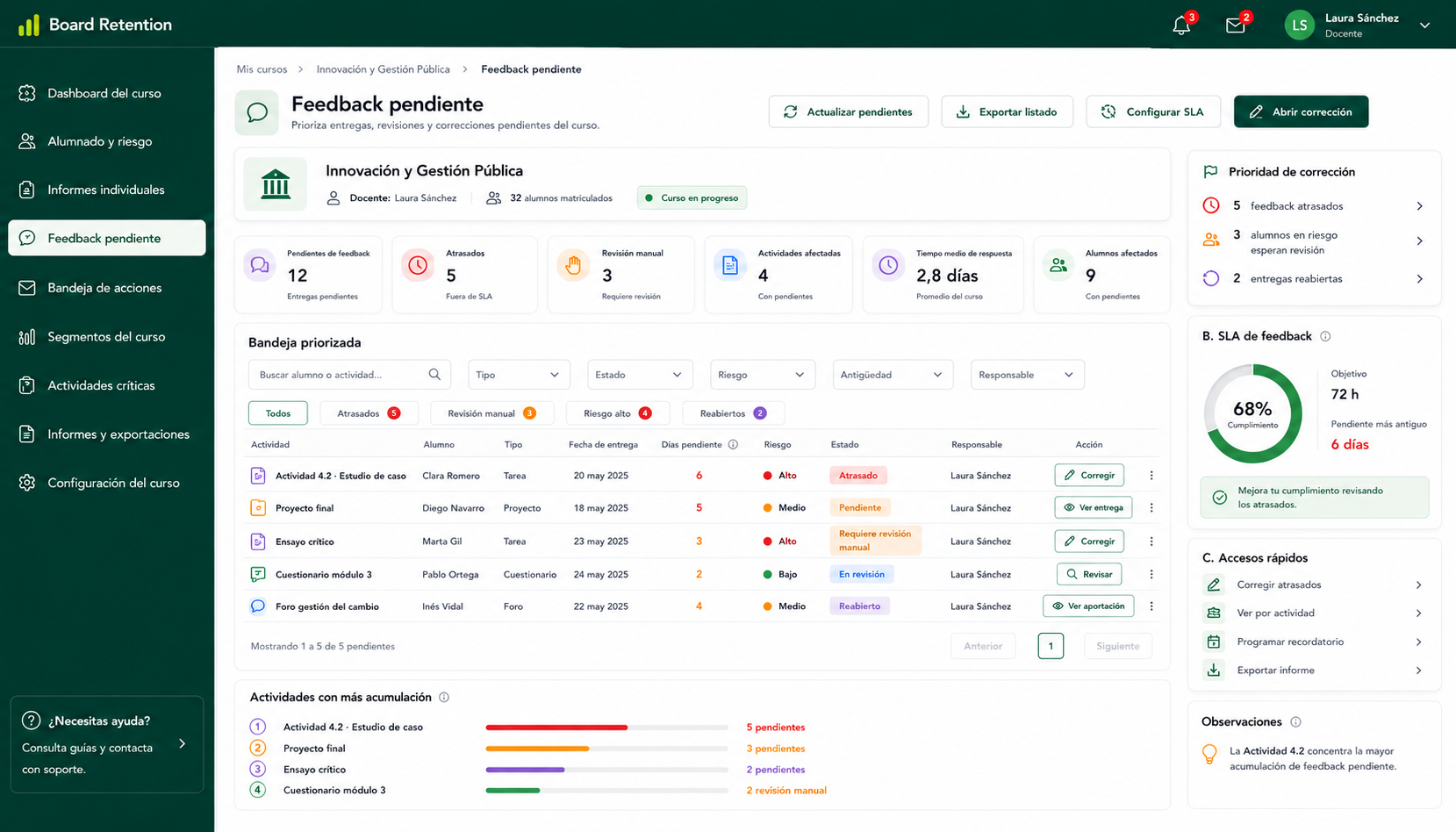
Pending feedback and tasks

Centralize activities pending review, accumulated submissions, pending comments and tasks that need attention.

04

Individual student report

Review each learner’s progress, grades, activity and follow-up history from a single view.

05

Configurable exports

Export the information needed for coordination, academic leadership or internal monitoring in reusable formats.

06

Scheduled reports

Prepare recurring reports to reduce repetitive manual work and bring consistency to academic monitoring.

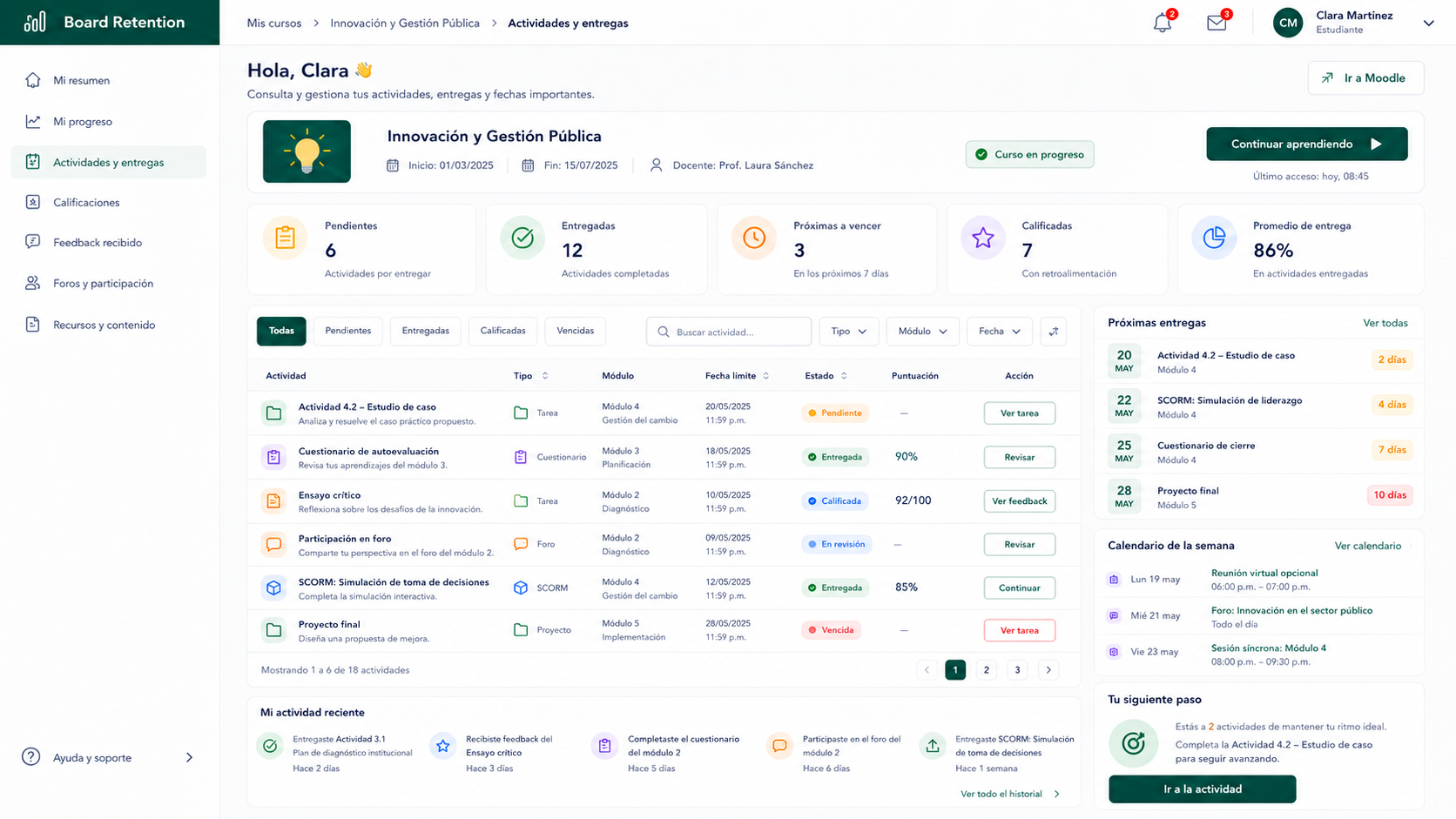
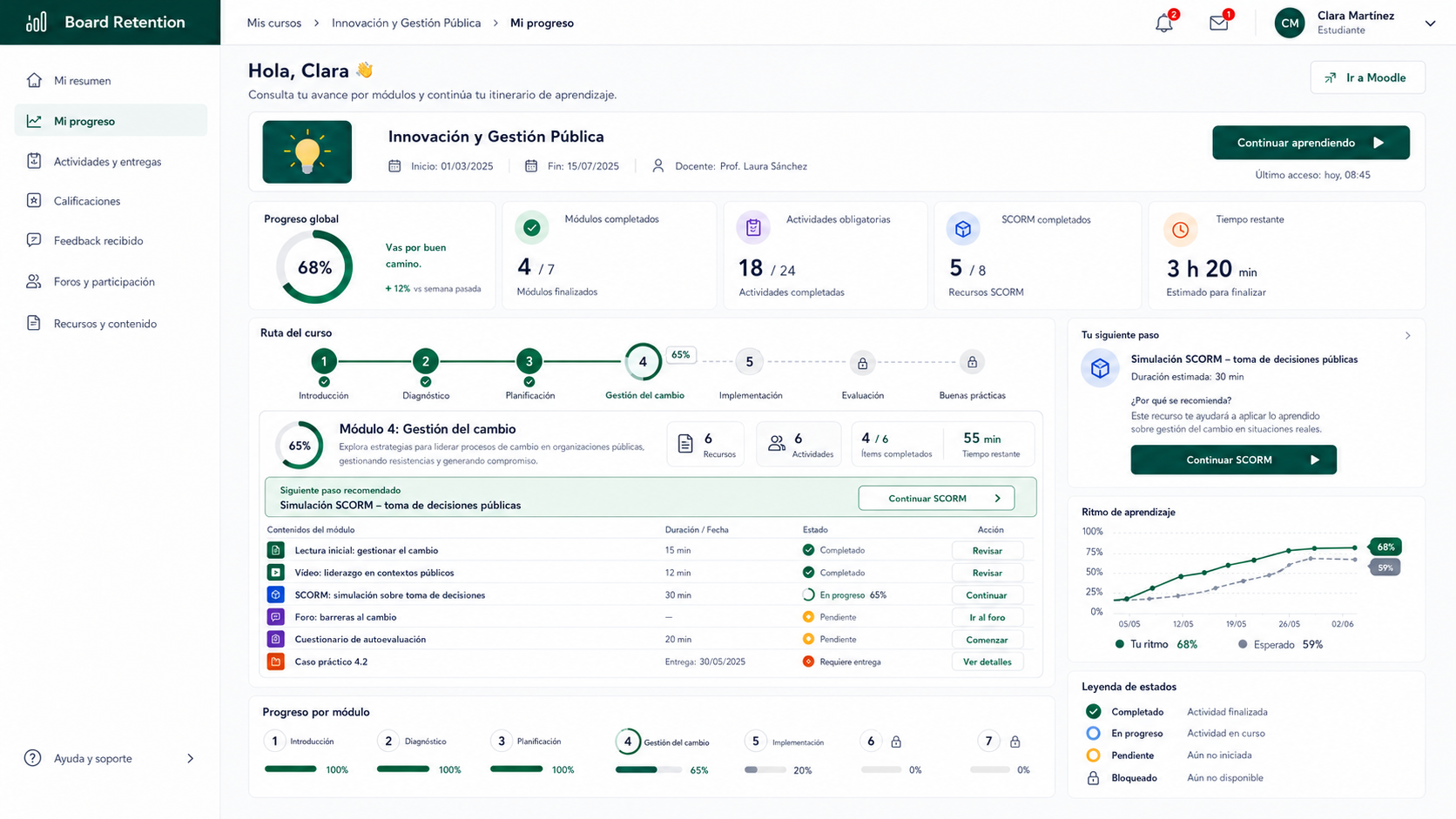
Progreso por módulos y SCORM en Board Retention
Progreso y módulos

Ruta visual de aprendizaje con seguimiento por módulos, SCORM y actividades.

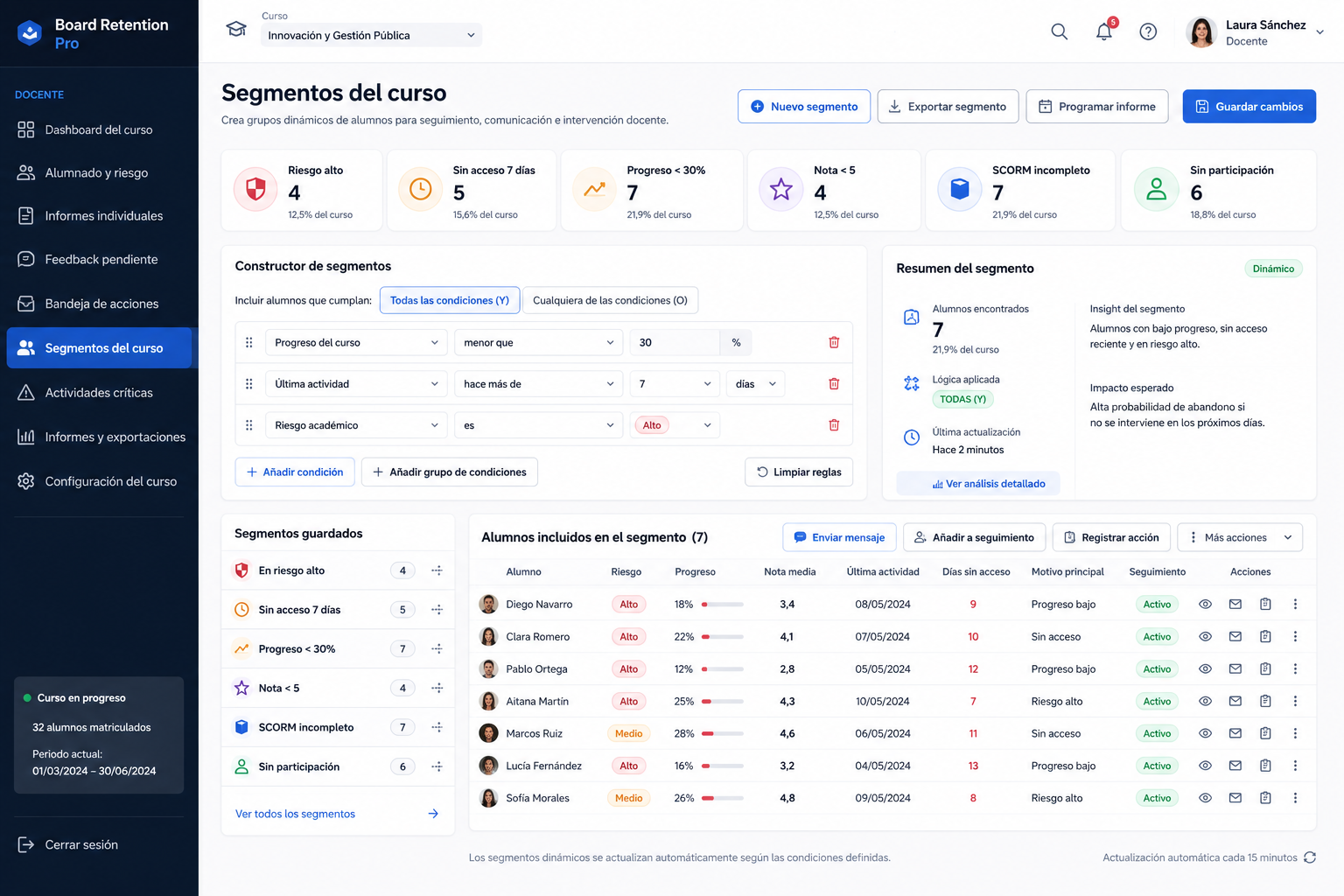
Segmentos guardados en Board Retention — filtros dinámicos de alumnado
Segmentos del curso

Segmentos predefinidos y constructor visual de condiciones para filtrar alumnado.

Dashboard

A teacher dashboard to review progress, risk and feedback in Moodle

A centralized view to understand what is happening in your courses without navigating multiple screens.

Board Retention brings together KPIs, activity, progress, feedback, risk signals and reports in a dashboard designed for daily academic monitoring.

Progress and completion in one view

Review course progress, completed activities and group evolution from a single dashboard.

Reviewable risk signals

Identify changes in activity, engagement or performance that may require teacher follow-up.

Pending feedback and tasks

Find accumulated submissions, activities pending review and feedback that needs attention faster.

Filters by course, group or period

Adjust the view according to the monitoring context each teacher or coordinator needs.

Reports and exports ready to use

Turn dashboard information into useful reports for coordination, leadership or internal monitoring.

Teacher dashboard

Quick overview of progress, risk and feedback

Updated

Average progress

78%

At-risk students

6

Pending feedback

18

Follow-up priority

Students requiring teacher attention based on available indicators.

Needs attention

Maria Garcia — low progress

3 unsubmitted activities and grade has dropped by 20%.

Carlos Lopez — inactivity

No platform access in the last 12 days.

Active alerts

3 unreviewed

Scheduled reports

2 for today

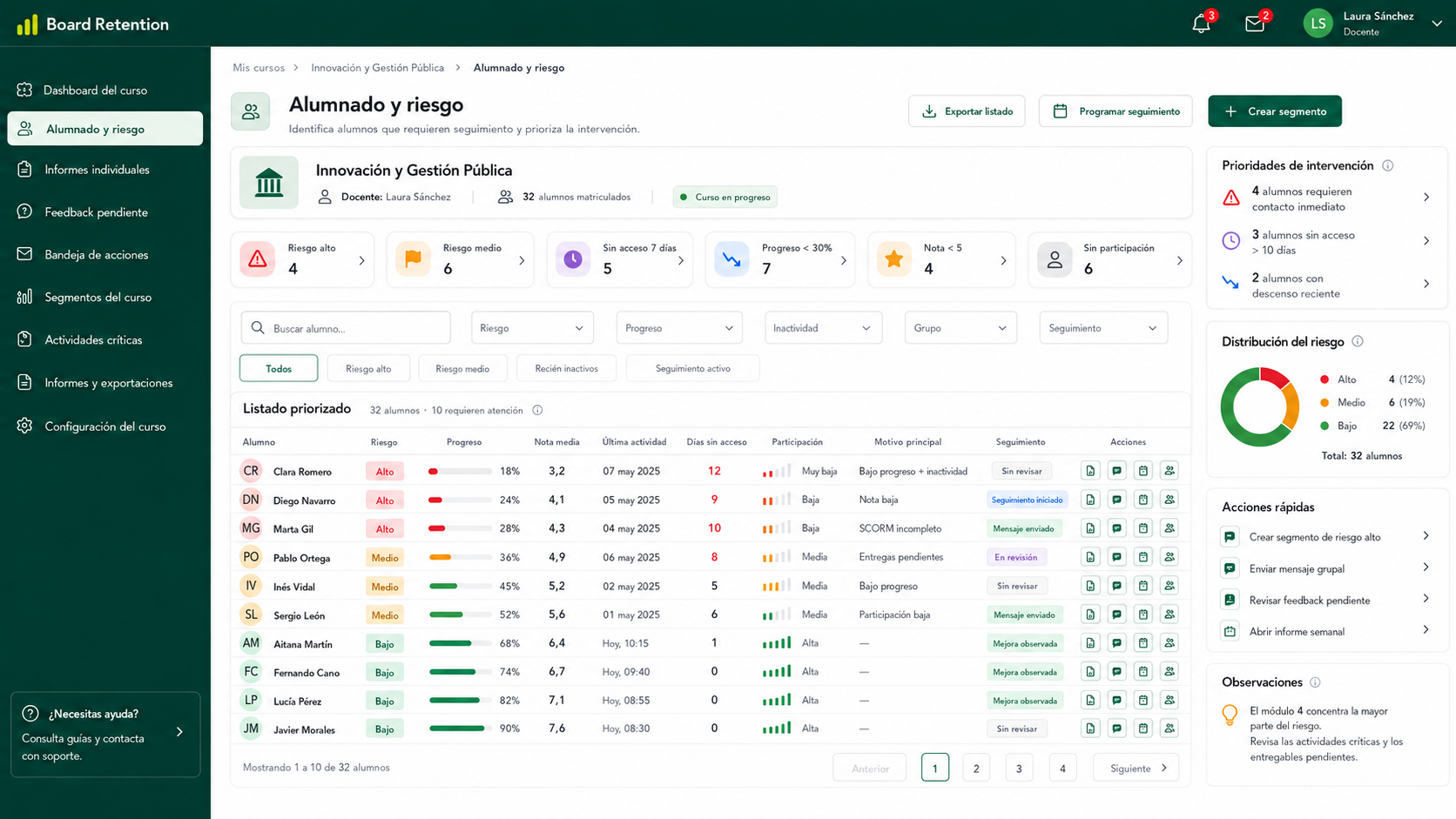
Vista de alumnado y detección de riesgo en Board Retention
Alumnado y riesgo

Listado accionable con indicadores de riesgo, progreso y última actividad por alumno.

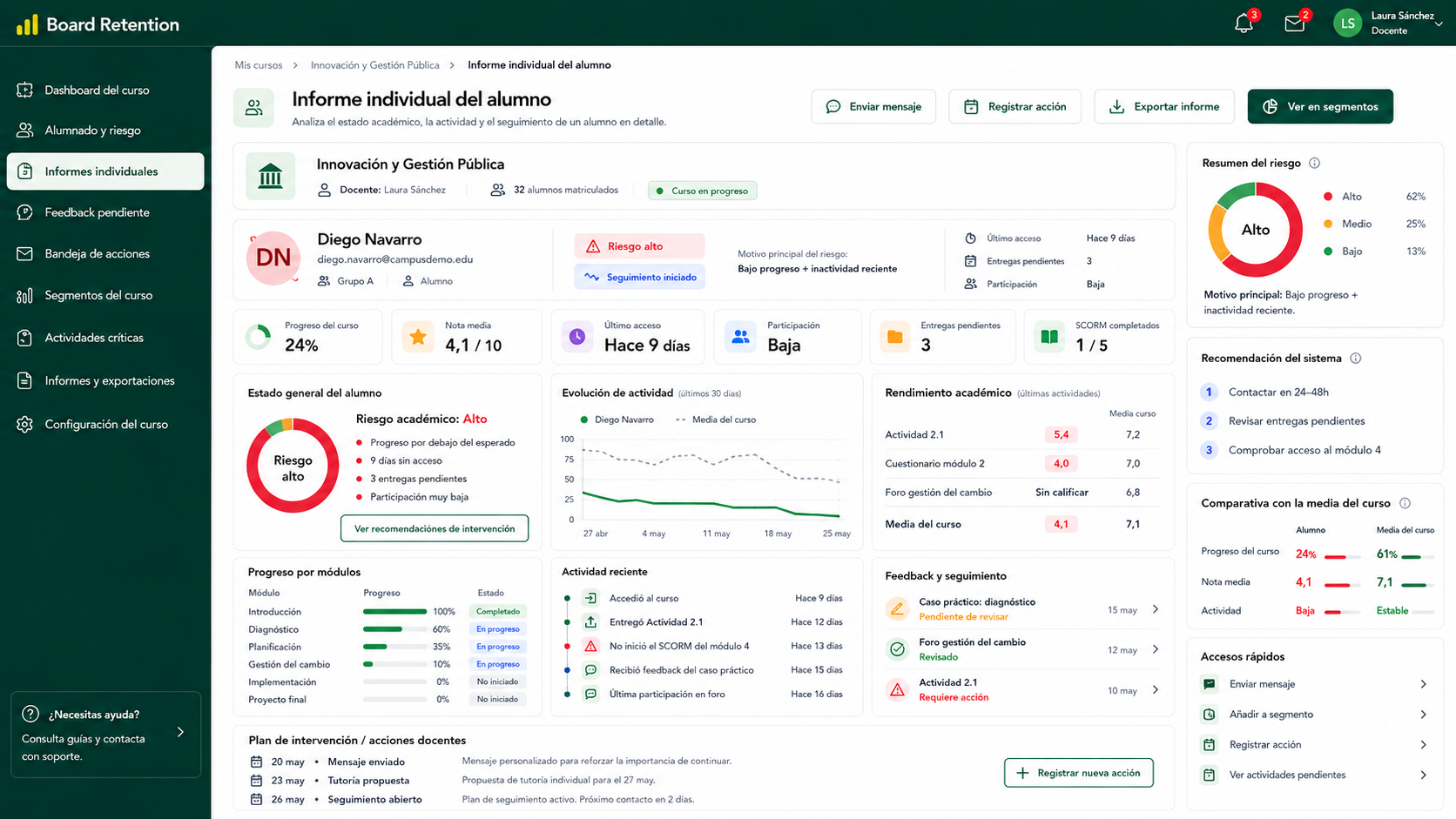
Informe individual del alumno en Board Retention — ficha 360°
Informe individual

Ficha completa del alumno con progreso, notas, actividad, feedback y contexto de riesgo.

Access

Data under control: read-only access, permissions and traceability

Board Retention is designed to query Moodle data while respecting institutional roles, permissions and internal policies.

Read-only access

The solution is focused on querying and visualizing information, without altering grades, courses or activities.

Data inside Moodle

Monitoring is based on information already available in Moodle, without creating an external copy unless the project configuration requires it.

Permission-aware access

Access to information should be configured according to Moodle roles, permissions and the responsibilities of each institutional profile.

Designed to support compliance

Designed to support GDPR, local data protection requirements and internal privacy and security policies.

Integration

Works with common Moodle data and tools

Board Retention uses existing Moodle information to generate indicators, reports and useful visualizations.

SCORM reports

Track completion, scores, attempts and progress of SCORM content when properly recorded in Moodle.

Grades

Review grades, categories and academic history available in the Moodle gradebook.

Assignments

Monitor submissions, deadlines, grades, feedback and activities pending review.

Forums

Review participation, contributions and activity in collaborative spaces to better understand learner engagement.

Surveys

Review responses and results when they are part of the institution’s academic monitoring model.

Course access

Analyze access, usage frequency and recent activity to identify participation patterns.

Reporting

Moodle reports that scale with your institution

Role-based configurable reporting ready for institutional operations.

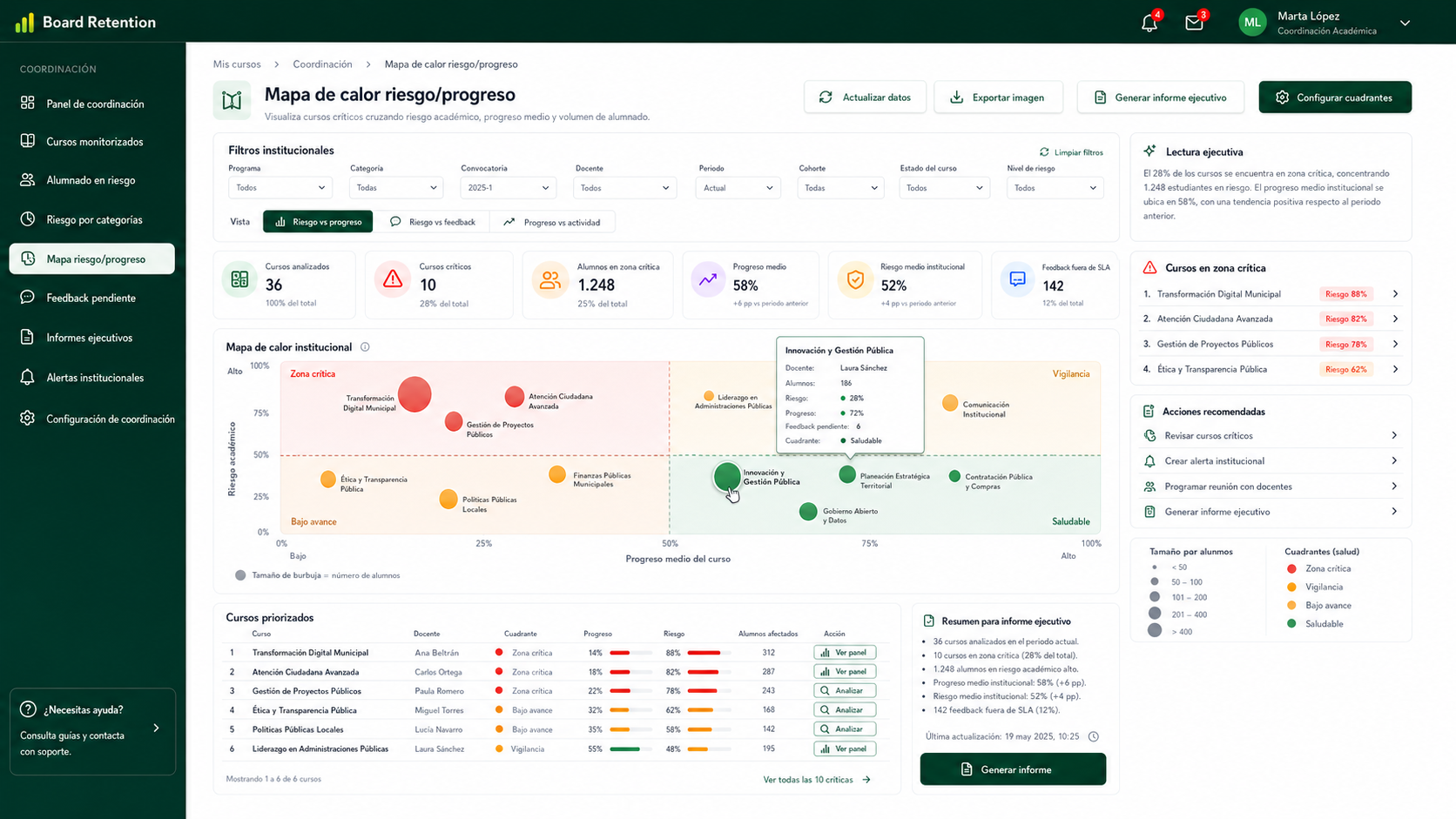
Board Retention supports recurring reports, exports, and monitoring views for teachers, coordinators, and academic leaders.

Filters by period, group, activity or combinations

Exports in useful formats for internal monitoring

Scheduled reports according to each role’s needs

Automatic weekly teacher report

Automatic executive report for coordination

Reusable templates for recurring follow-up

Moodle reports that scale with your institution

Role-based configurable reporting ready for institutional operations.

Filters by period, group, activity or combinations

01

Exports in useful formats for internal monitoring

02

Scheduled reports according to each role’s needs

03

Automatic weekly teacher report

04

Automatic executive report for coordination

05

Reusable templates for recurring follow-up

06

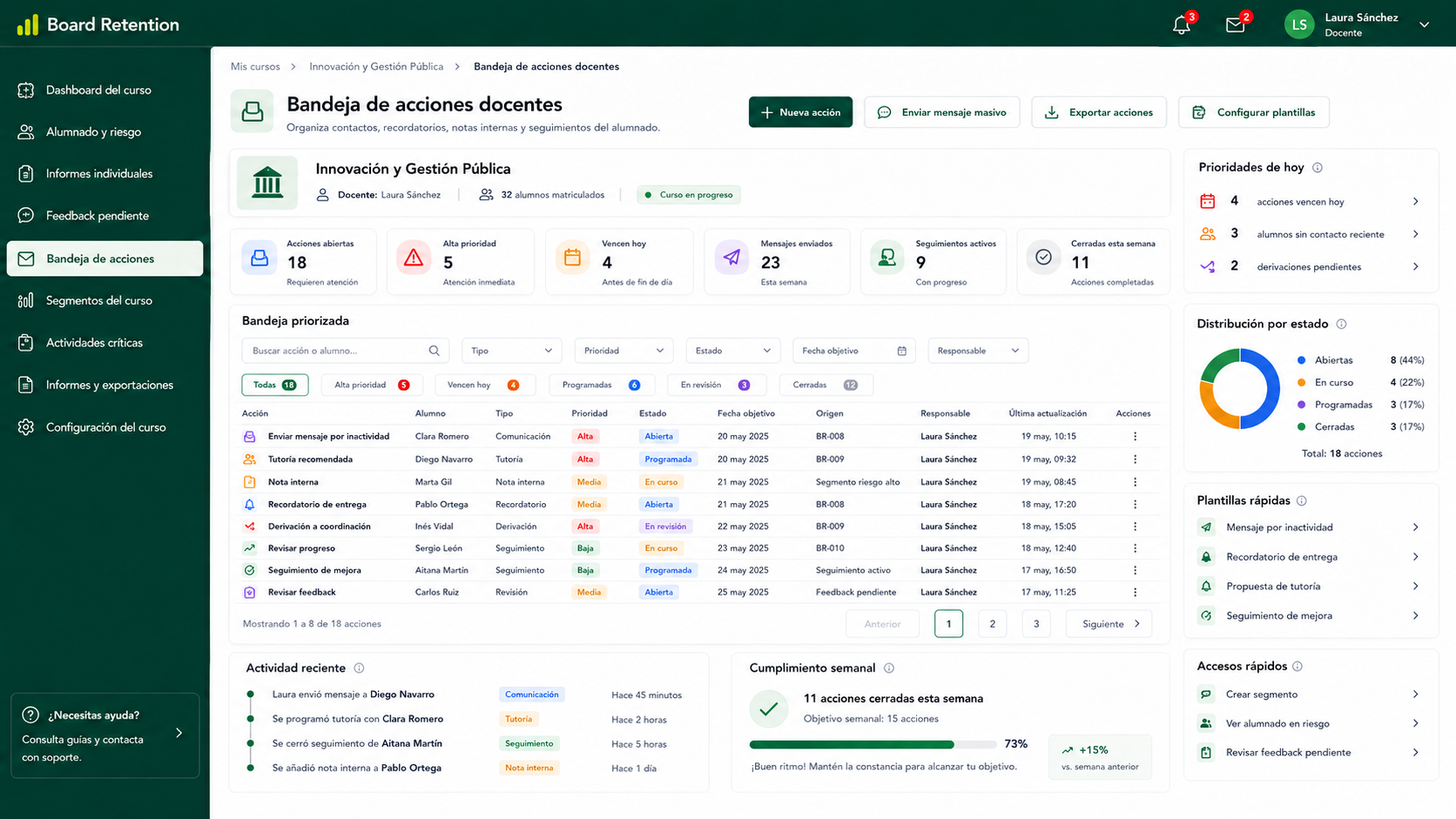
Bandeja de acciones docentes en Board Retention
Bandeja de acciones

Registro de notas internas, contactos, recordatorios y seguimiento por alumno.

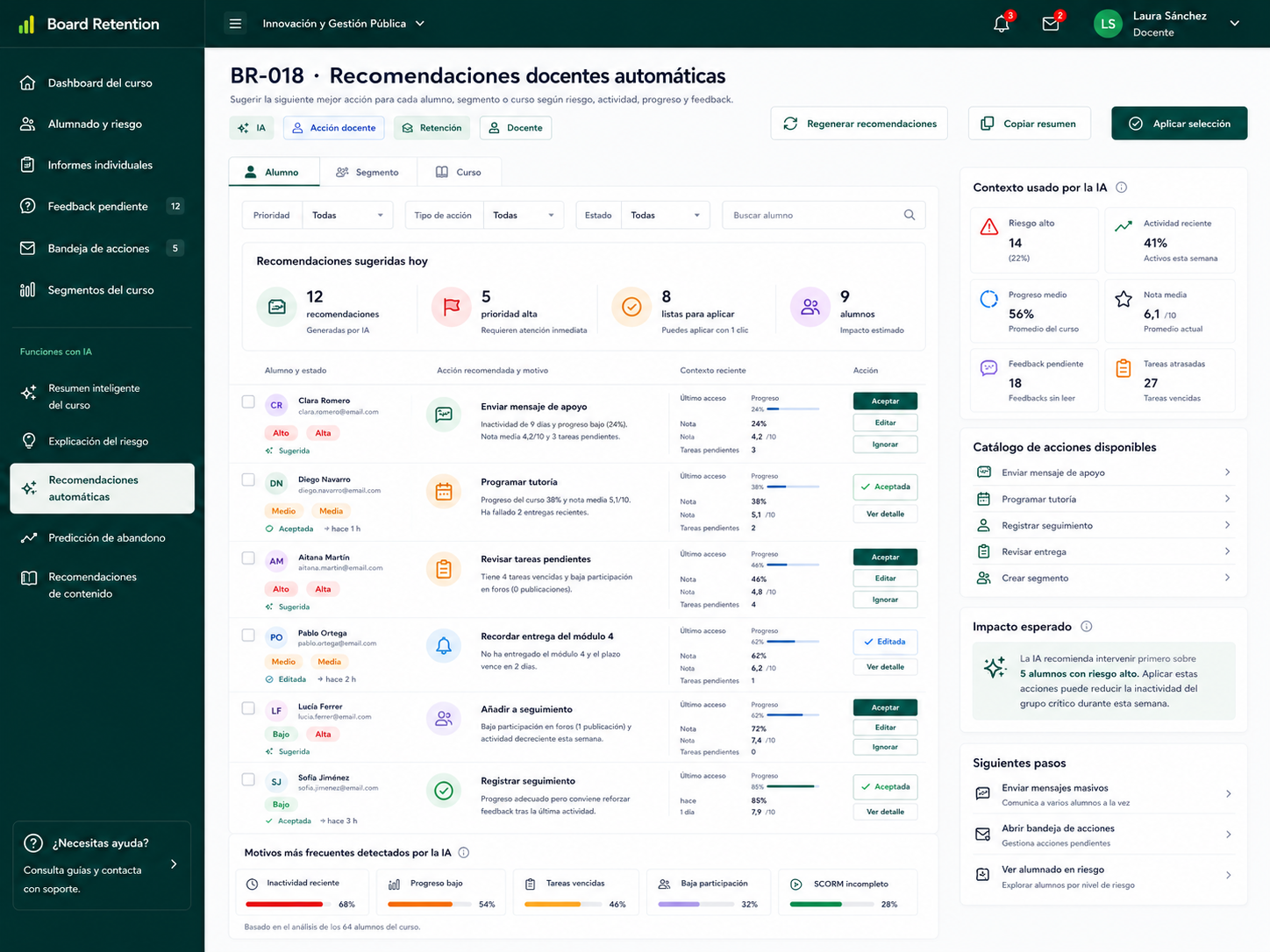
Recomendaciones docentes automáticas con IA en Board Retention
Recomendaciones automáticas

Sugerencias de acción personalizadas basadas en el historial del estudiante.

Performance

Performance designed for Moodle installations with many courses and users

Designed to query and present indicators efficiently, without adding manual work to the reporting process.

01

Optimized queries

Indicator calculation and visualization designed to reduce repetitive manual operations.

02

Efficient data usage

Queries and structures designed to minimize unnecessary load and support aggregated views.

03

Scalable by context

Actual performance depends on the Moodle installation, database, configuration, number of courses and user volume.

04

Non-intrusive reads

A query and visualization model designed not to interfere with the regular work of teachers and learners.

IA

Inteligencia artificial como apoyo al docente

Capacidades IA planificadas para resumir, explicar, comunicar y detectar patrones — siempre bajo supervisión humana.

Want to see these features applied to your Moodle?

See how to centralize KPIs, risk signals, feedback, exports and scheduled reports in a personalized demo.